Before and after
One SSIS package from the public MSBI labs used in Get started, and the Hop workflow and pipeline the importer made from it, without any edit. The package reads a CSV file of customers, upper-cases their names, and loads them into a SQL Server table.
The SSIS package

Drawn from Lab1.dtsx, the file the importer reads: the tasks, components, their names and paths
are exactly what the package holds. It is not a screenshot of the SSIS designer.
The Hop workflow and pipeline
The package becomes the workflow Lab1.hwf: a Start action, then a Pipeline action Load CSV that
runs the pipeline of the Data Flow Task, Lab1/Load CSV.hpl:
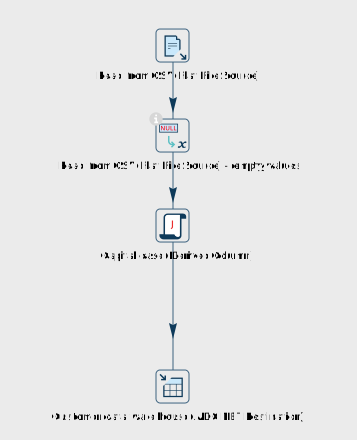
Drawn by Apache Hop from the generated Load CSV.hpl, unchanged. The importer places each
transform where the SSIS designer had its component, so the pipeline keeps the package's top-to-bottom
shape; the transform it adds, the check of empty values after the source, goes between the two it
connects.
Component by component
| SSIS | Hop | What carried across |
|---|---|---|
Package Lab1 | Workflow Lab1.hwf | The control flow: a Start action, then the package's task |
Data Flow Task Load CSV | Pipeline action, running Lab1/Load CSV.hpl | Name and description; the run configuration local |
Read from CSV (Flat File Source) | CSV file input | File name, , delimiter, header row, the four columns CustomerCode, CustomerName, CustomerAmount and SalesDate |
| — | If null, Read from CSV (Flat File Source) - empty values | Added by the importer: SSIS reads an empty value in a delimited file as an empty string or zero, not NULL, and this transform does the same |
Capital case (Derived Column) | User Defined Java Class | UPPER(CustomerName) translated to Java, into the new column UCustomerName (string, length 50); NULL stays NULL, as in SSIS |
Customer data ware house (ADO NET Destination) | Table output | The connection, dbo.tblCustomer, and the column mapping: UCustomerName goes to CustomerName, the other columns by name |
Connection manager AMIT-PC\SQLEXPRESS.CustomerDatawareHouse | Relational connection AMIT-PC_SQLEXPRESS.CustomerDatawareHouse | SQL Server host and database; renamed because a backslash is not valid in a file name |
Every component is reported AUTO, nothing in the package is flagged, and the names are kept, so
the report, the pipeline and the original package all talk about Capital case (Derived Column).
Does it do the same thing?
We ran the generated workflow on Hop 2.19 against SQL Server 2022, changing only the connection
(a SQL login instead of Windows authentication on the author's machine) and the path of the input
file, as in Get started. It reads the ten rows of Lab1.txt
and writes them to tblCustomer with the names in capitals.
Lab1 is a training lab that the project's master package does not run. The five packages the
master does run (Country, Product, SalesPerson, States and FactCustomer, two of them through the SCD
wizard's Slowly Changing Dimension) were run with SSIS on Linux and, converted, with Hop, from the
same files, before and after the files change: the tables they load are the same on both sides.
On your own packages, check this with a parallel run.
What this example does not show
This is one of the simplest packages in the project, picked because it converts completely. The
report for the whole project shows what does not: in Lab2 and
Lab3, a Data Conversion's error output is not routed. On real projects, most of the work is in
Script Tasks and Script Components, Execute SQL Tasks whose parameters become text in the SQL,
connections and their passwords, and the components the importer does not convert. The report
lists every case.